
You're sitting in a golf cart with your phone plugged into the dashboard, but the screen still won't show your maps. Or you're ordering a new UTV and trying to decide whether its touchscreen will work with your phone. Searching for an Android Auto device turns up replacement stereos, wireless adapters and factory systems, often presented as if they solve the same problem.
They don't. The right purchase starts with what your vehicle already supports, then works outward to your phone, wiring and driving environment. A dongle won't rescue an incompatible screen, and a car stereo that works perfectly inside a sedan may be a poor fit for an open cart.
Table of Contents
- Android Auto Device Options at a Glance
- How Each Device Connects to Your Phone
- Compatibility Checks Before You Buy
- Performance Differences You Notice Every Day
- Matching Devices to Golf Carts, UTVs and Fleets
- Hidden Costs and Warranty Trade-offs
- Confirm Fit and Choose Your Android Auto Device
Android Auto Device Options at a Glance
Android Auto device types compared
| Device type | Typical price | Installation effort | Best fit | Main trade-off |
|---|---|---|---|---|
| Aftermarket head unit | Quote the receiver, fitting parts and labor together | Professional install with wiring harness and dash kit | Vehicles with no screen or a dated one | Full replacement, but labor and fitting parts add cost |
| Wireless dongle or adapter | Accessory purchase, usually less work than replacing the receiver | Plug into the compatible Android Auto USB port and complete initial pairing | Factory screen that already supports wired Android Auto | Avoids receiver replacement, but relies on the existing screen and phone |
| Built-in factory system | Included in vehicle price | None after purchase | New vehicles where integrated controls matter | Integrated installation, but hardware and software support remain tied to the vehicle |
A head unit replaces the receiver and display assembly. It's the appropriate route when the existing equipment can't receive Android Auto, but buying the screen is only part of the job. Mounting depth, dash clearance, power connections and speaker wiring all need checking.
A wireless adapter changes how a compatible phone connects to an existing receiver. It doesn't add Android Auto to an ordinary USB charging port or an unsupported touchscreen. Initial pairing may be straightforward, but shared vehicles still need sensible phone-selection settings.
Choose the job before the product
Factory equipment offers a clean installation without asking you to solve brackets, loose cables or dashboard trim. However, a factory system supporting Android Auto isn't automatically a vehicle running Android Automotive. Those are different software arrangements.
For pricing, get a current local quote rather than treating an advertised receiver price as an installed total. Model, region, fitting parts and retained vehicle functions affect what you'll pay.
This comparison identifies which type fits, not which brand wins. I'd establish whether the existing screen supports wired Android Auto before shopping for any adapter, then verify the phone and installation requirements before committing.
How Each Device Connects to Your Phone
Your phone is the source for Android Auto projection. It runs the supported navigation, media and communication apps; the receiver provides the vehicle-facing display and controls. Buying a different screen doesn't remove that phone dependency.
This interface is familiar to many drivers: in 2025, 40% of U.S. adults aged 18 and older who had recently been in a car reported having Apple CarPlay or Android Auto in their primary vehicle, according to SSRS and Edison Research. That's a combined ownership measure, not Android Auto's individual share.
The connection path helps explain where failures occur.
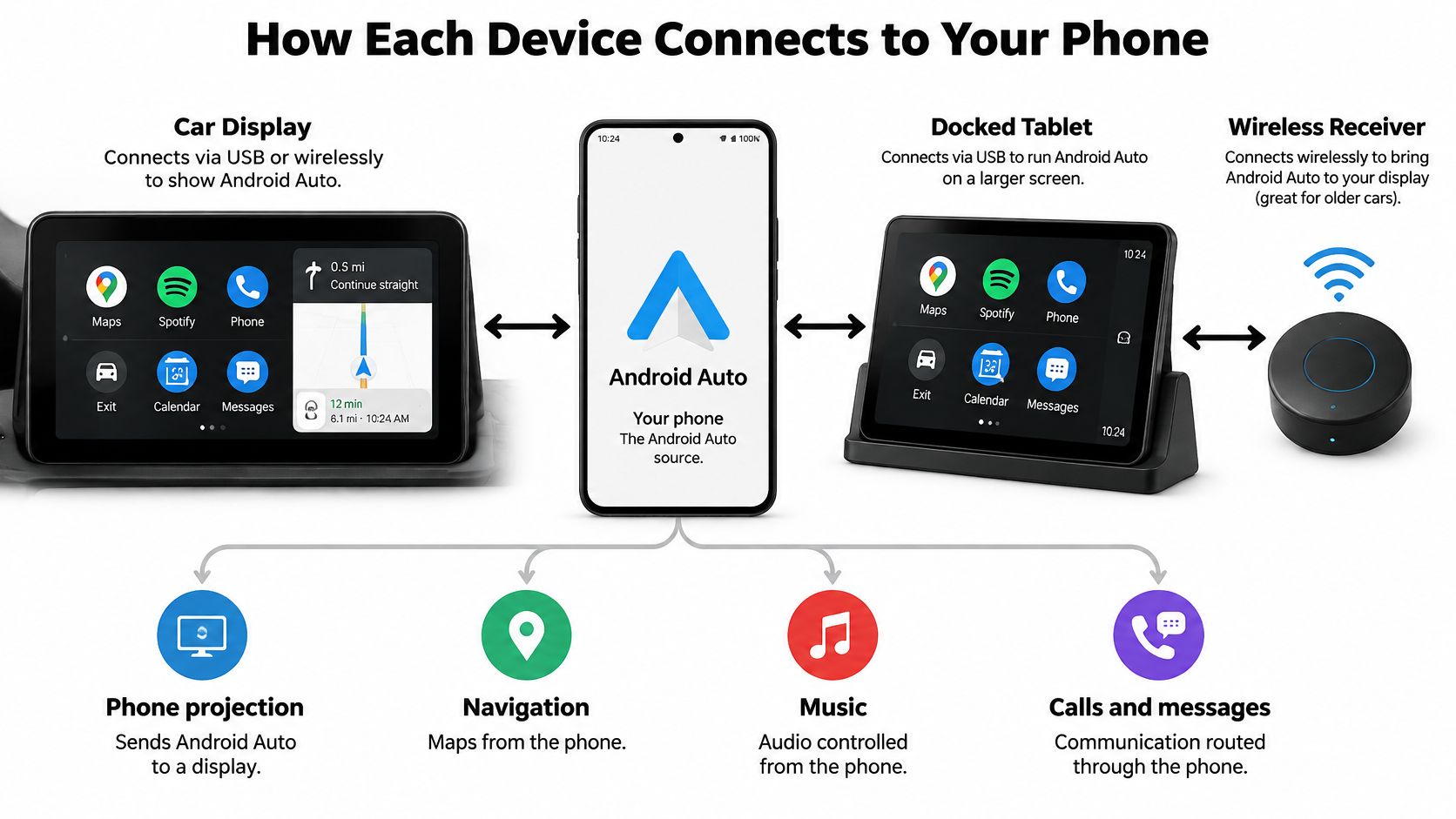
- Phone starts projection. Android Auto opens the supported driving interface rather than mirroring every app on the phone.
- Receiver accepts the connection. USB carries wired projection; wireless operation uses a Wi-Fi connection after the pairing process.
- Display and controls complete the loop. The receiver shows the interface and routes supported touch, microphone and control inputs back through the system.
A wireless adapter sits between the phone and a receiver that already accepts wired projection. It bridges that connection; it doesn't become an independent navigation computer. The CarPlay and Android Auto adapter guide provides a useful starting point when identifying this accessory category.
Factory installation isn't a software definition
Android Automotive runs inside the vehicle. Its native apps, hardware integration and update arrangements depend on the vehicle's implementation. A vehicle can also offer Android Auto projection alongside its built-in software.
That distinction matters when a sales listing says built-in Android. Ask whether it means phone projection, a native vehicle operating system, or merely an Android-based aftermarket receiver.
A head unit replaces the receiver, a dongle replaces the cable connection, and Android Automotive moves the native software into the vehicle. A factory Android Auto screen still uses your phone.
Phone-side app improvements can reach projection users without replacing the receiver, but they can't overcome every hardware limitation. Screen shape, microphone quality, control integration and receiver support still belong to the vehicle side of the connection.
Compatibility Checks Before You Buy
Wired versus wireless requirements
| Requirement | Wired | Wireless |
|---|---|---|
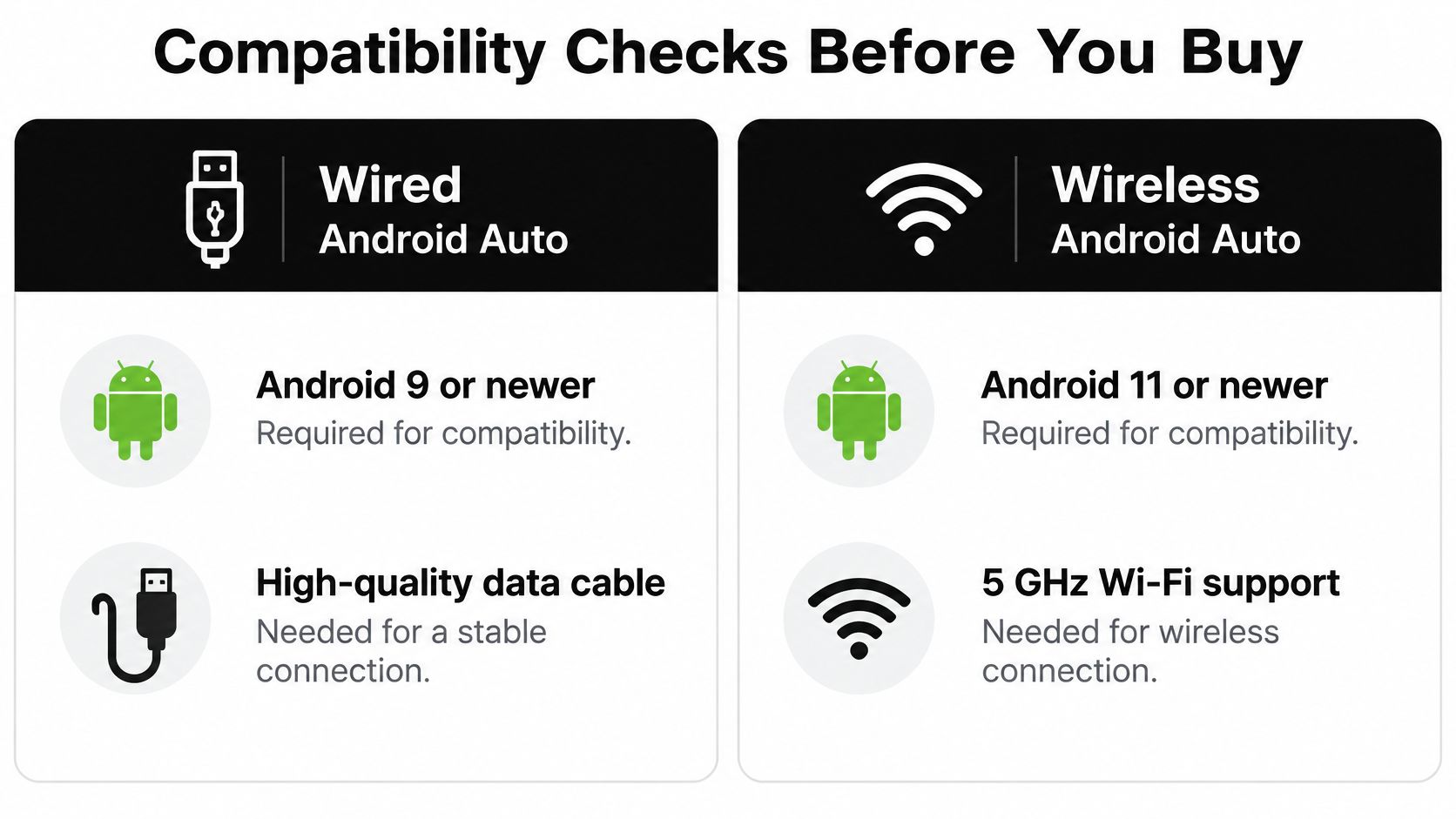
| Android version | Android 9 or newer | Android 11 or newer |
| 5 GHz Wi-Fi support | Not required for projection | Required |
| Active data plan | Not required for the USB connection itself; online features still need connectivity | Required |
| Bluetooth for first-time pairing | Not required to establish USB projection; follow receiver prompts for other functions | Required |
| USB data cable | Required, not charge-only | Not required after pairing |
| Compatible vehicle or stereo | Required | Required |
Android's compatibility guidance lists Android 9 or newer for wired use and Android 11 or newer with 5 GHz Wi-Fi for wireless use; it also identifies compatibility dependencies involving the phone and receiver. The Android Auto requirements page specifies an active data plan and Bluetooth-based initial pairing for wireless operation, and a high-quality USB cable for wired use.
Run these checks with your actual phone
- Read the Android version in Settings. Record the exact phone model too. A brand name such as Samsung or Pixel isn't enough to establish compatibility.
- Verify the phone's wireless capability. Check its specifications against the wireless requirements. Your home router isn't part of the vehicle's projection connection.
- Prove that the cable carries data. Transfer a file between the phone and a computer, then test the cable in the vehicle's designated projection port. Charging successfully doesn't prove data capability.
- Confirm explicit Android Auto support. Look at the receiver documentation and its connection menu. Bluetooth audio, USB playback and phone mirroring aren't interchangeable with Android Auto.
- Isolate VPN interference. If permitted by your security policy, temporarily disconnect the VPN while parked and retest. Where supported, investigate split tunneling instead of permanently abandoning protection.
- Check modified operating systems separately. With privacy-focused systems such as GrapheneOS, verify Android Auto setup, required Google Play components and permissions. Don't assume a standard Android setup applies.
If you're replacing a phone or changing mobile service, you can browse eSIM-supported phones and tablets through RedSim to check cellular-device options. eSIM support isn't Android Auto certification, so keep those checks separate.
For the vehicle side, use the Android Auto interface guide to distinguish receiver functionality from phone requirements. At delivery, have the actual buyer's phone paired and tested, including the wired fallback where available.
An adapter can't supply missing phone hardware, install absent services or make an unsupported display accept projection. Establish the failing link before buying another accessory.
Performance Differences You Notice Every Day
Independent CarPlay Life adapter testing found that the fastest tested wireless adapter reached Android Auto in approximately 8 seconds, while the slowest was materially slower. That result describes the tested equipment and setup, not a guaranteed startup time for your cart.
Startup delay matters when a guest climbs aboard a resort shuttle or a buyer starts a dealership demonstration. If the driver has already pulled away before navigation becomes usable, a fast-looking touchscreen hasn't delivered a useful experience.
Test the whole startup sequence
Use a stopwatch and a simple worksheet. Keep the phone, receiver settings and test location consistent so you're comparing devices rather than changing several conditions at once.
- Cold start: Let the receiver shut down fully, then time from ignition or accessory power to a map you can use.
- Warm reconnect: Restart with the phone already paired. Record whether the receiver resumes the intended app and audio source.
- Range recovery: While safely parked, take the phone out of wireless range and return. Note whether reconnection happens automatically or needs intervention.
- Driver change: Switch between paired phones. Record which phone gets priority and whether the intended driver can select theirs without deleting another user.
Include failures in the log, not just successful timings. A blank screen, missing call audio or a connection that needs the adapter unplugged matters more than a flattering best-case result.
Practical rule: Headline speed matters less than whether the connection works every time.
A wired system deserves the same scrutiny. Move the cable gently near each connector while parked and watch for interruptions; a loose port or strained connector can make an otherwise compatible installation unreliable.
For fleets, repeat the routine across normal operating conditions rather than approving equipment after a single demonstration. Test after updates, too. The useful question is whether drivers can begin work without troubleshooting, not whether someone once achieved a quick connection.
Matching Devices to Golf Carts, UTVs and Fleets
Device fit by vehicle class
| Vehicle class | Likely device fit | Key check before buying |
|---|---|---|
| Street-legal golf cart | Built-in system or wireless adapter serving an existing sealed screen | Sunlight readability and glove-friendly touch |
| Recreational UTV or off-road cart | Rugged head unit, or dongle behind a suitable existing receiver | Weather exposure, vibration suitability and speaker output |
| Resort or campus shuttle | Standardized wireless adapters on compatible receivers | Cold-start behavior and phone switching |
| Gated-community household cart | Dongle on an existing compatible screen | Actual household phone compatibility |
| Dealer demonstration fleet | Standard head unit or built-in system | Repeatable pairing and delivery checks |
The display's surroundings matter as much as its connection method. A weather-resistant screen doesn't automatically protect its rear connectors, USB socket, microphone or adapter.
Open vehicles need installation discipline
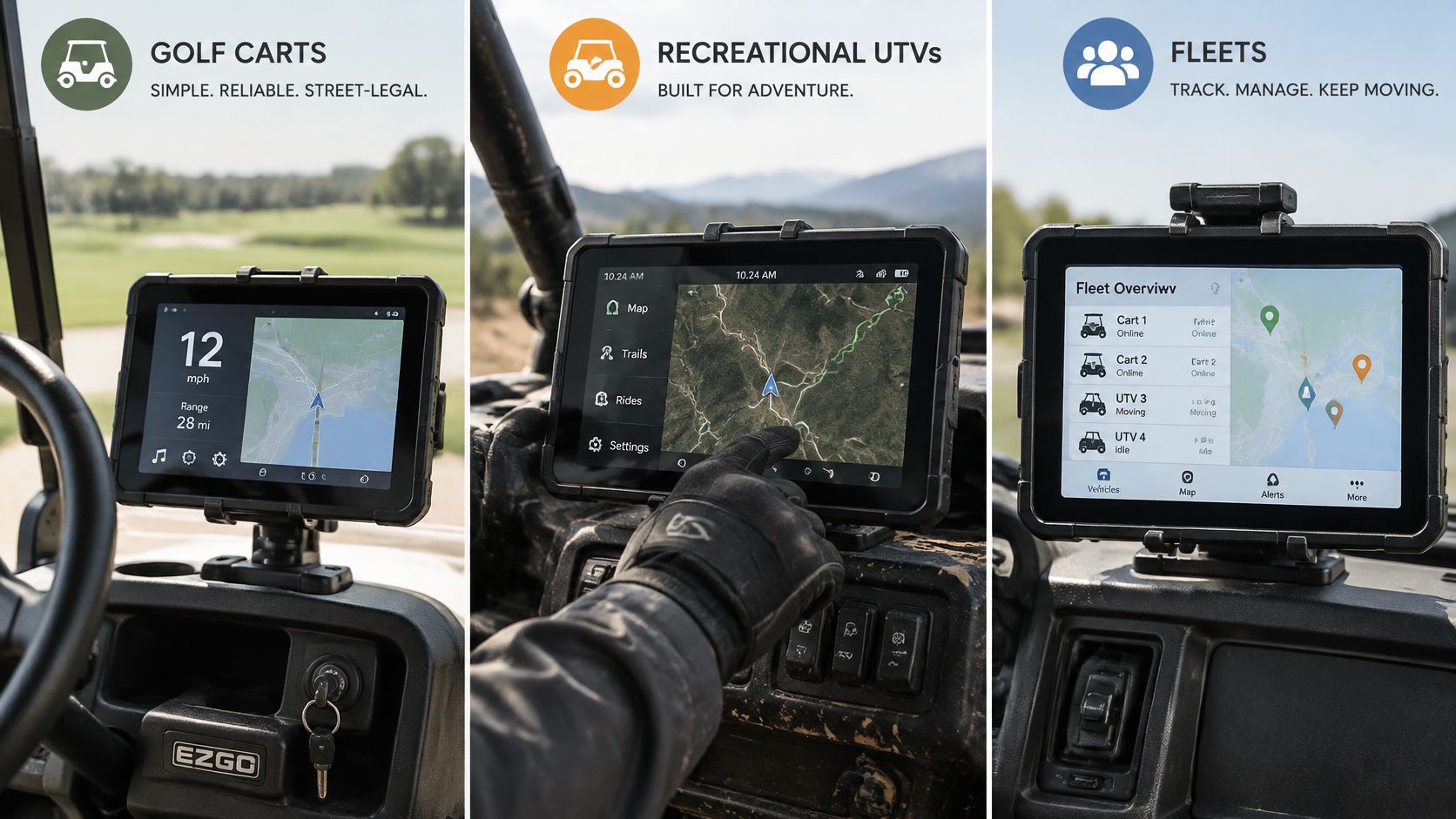
For a street-legal golf cart, inspect the map from the seated driving position in direct sunlight. Check reflections with the windshield in its normal position, and try the controls wearing the gloves you use. A glossy screen that looks excellent indoors can be difficult to read outside.
The golf cart dashboard guide can help frame the layout decision. Keep the display clear of essential switches and sightlines, and provide cable strain relief rather than leaving a phone lead hanging across the dash.
A recreational UTV needs more than a receiver described as rugged. Obtain the manufacturer's exposure and vibration specifications, inspect mounting support, and protect plugs from spray and abrasion. Have the installer confirm the accessory supply requirements instead of connecting equipment directly to the traction battery.
Audio deserves its own test. Check navigation prompts and calls with the vehicle operating in its intended environment. Confirm amplifier compatibility and microphone placement before buying speakers solely on advertised power.
Shared vehicles need predictable ownership
For resort and campus shuttles, standardize receiver and adapter models where practical. Write down the pairing procedure, define who may connect a personal phone, and remove guest pairings during turnover.
A household cart has different priorities. Easy selection between regular drivers may matter more than elaborate fleet controls. For a dealer demonstration vehicle, keep a known-working demonstration phone available without treating it as proof that every customer's handset will work.
- Charging behavior: Check that the phone maintains a useful charge while running navigation, particularly with wireless projection.
- Physical access: Keep the service port reachable without dismantling trim.
- Heat exposure: Follow operating-temperature guidance and avoid trapping the phone or adapter in a sun-heated compartment.
Buy usable features, not future promises
Google's Android in cars update describes evolving layouts, widgets, navigation and assistant functions, while limiting video streaming to compatible vehicles during parked operation. Don't assume an aftermarket cart display will receive every announced capability.
Ask for confirmation of the exact receiver's supported features. On an open vehicle, readable directions, clear prompts and dependable controls are more useful purchase criteria than entertainment you may never be able to use appropriately.
Hidden Costs and Warranty Trade-offs
Costs beyond the device price
| Cost item | Practical note |
|---|---|
| Professional head unit installation labor | Request a quote based on dash access, mounting and retained functions |
| Wiring harness and dash kit | Common fitting requirements; identify exact parts before ordering |
| Quality USB data cable | Specify data capability, connector fit and a protected routing path |
| Replacement dongle after a failure | Check the seller's return window and replacement process |
| Warranty impact of an aftermarket device | Using official Solana EV parts keeps the factory warranty safe |
A receiver's advertised price isn't an installed quote. Removing trim, fabricating a mounting panel, retaining a camera or correcting previous wiring can change the scope substantially. Ask the installer to separate hardware, fitting materials and labor so you can compare like-for-like proposals.
For an adapter, the hidden expense is often troubleshooting time rather than dashboard work. Confirm the return process before purchase, especially if the seller hasn't established compatibility with your exact receiver.
Compare complete jobs
Consider a household cart that already has a functioning projection screen. An adapter quote should cover the accessory, any necessary cable and setup. Replacing the head unit adds removal, fitting, wiring and configuration, so it needs to solve a problem the adapter cannot.
Now consider a cart with only a basic radio. The cheaper adapter isn't a competing solution because there's no compatible receiver behind it. Paying for the correct head unit installation is more sensible than buying an accessory that can't perform the required job.
The sticker price rarely decides the total cost. Installation work, troubleshooting and replacement failures do.
Don't approve an installation that relies on twisted wires and tape, unsupported connectors or a cable pinched behind trim. Request a suitable harness where available, secure connections, appropriate circuit protection and a mounting arrangement that can be serviced.
Get the warranty position in writing
Using official Solana EV parts keeps the factory warranty safe. That policy shouldn't be generalized into a promise about every vehicle manufacturer or every third-party accessory.
For an aftermarket installation, identify the receiver, harness, power-conversion equipment and installer before authorizing work. Ask how coverage applies to the accessory and any affected vehicle components. Keep the quote, part details and installation record together so a later fault doesn't become an argument about what was fitted.
Confirm Fit and Choose Your Android Auto Device
Choose the least complicated device that solves the actual problem, not the one with the longest feature list.
- Your existing Android Auto screen works: Consider a wireless adapter if cable-free use is the goal. Keep the current receiver unless it has a separate problem.
- Your screen is obsolete or missing: Choose an aftermarket head unit when you want an integrated display. Approve the mounting, power and wiring plan with the hardware.
- You're ordering a new vehicle: A factory-installed system avoids retrofit work. Confirm the exact functions on the specification sheet rather than relying on a touchscreen photograph.
Before paying, gather the phone model, Android version, vehicle type and intended use. Include the receiver model if you already have one, plus details of any VPN or modified phone software. A neighborhood cart, exposed UTV and shared shuttle require different installation decisions even when the phone is identical.
Our carts support CarPlay and Android Auto. To confirm fit, call us at +1 972-268-6160 or send a sales inquiry to sales@solanaev.com. Ask us to confirm compatibility with your phone and vehicle, identify which cables and wiring parts are included, and clarify whether any additional installation work is needed.
A device matched to the vehicle's screen, the phone's software and the intended use is a better long-term purchase than a cheaper device that doesn't fit.
Solana EV offers electric golf carts and recreational utility vehicles, with carts supporting CarPlay and Android Auto. Visit Solana EV to explore the vehicles, then bring your phone and intended-use details to the fit discussion before choosing your dashboard setup.