
You're halfway around a resort in a golf cart when the route disappears. The factory radio still plays FM perfectly, but it can't show a map, read a message, or play the playlist you really want. Back at home, the same annoyance appears in a daily driver, only this time the problem is plugging in a Lightning or USB cable every time you start the car.
A CarPlay Android Auto adapter can remove that cable ritual, but it doesn't magically turn every radio into a smart display. It creates a wireless bridge between a phone and a head unit that already understands wired CarPlay or Android Auto. That distinction matters even more in golf carts and UTVs, where the screen, wiring, power supply, and radio may all be aftermarket.
Table of Contents
- Why a Wireless Adapter Changed My Daily Drive
- What a CarPlay Android Auto Adapter Actually Does
- The Installed Base That Made Adapters a Market
- Head Unit Compatibility and the Wired-Only Rule
- Wired, Wireless, OEM, and Retrofit Compared
- Installation From First Plug-In to First Connection
- Wi-Fi Tradeoffs, Dropouts, and Real Fixes
- Choosing the Right Adapter for Your Vehicle
Why a Wireless Adapter Changed My Daily Drive
The first time you use one, the appeal is simple. You start the vehicle, the phone connects, and the familiar navigation, music, calls, and messages appear on the existing display without reaching for a cable. The adapter stays plugged into the vehicle's USB data port, so the daily routine becomes closer to starting a car with factory wireless projection.
That convenience applies differently depending on the vehicle. In a commuter car, it means the phone can remain in a mount or pocket while the dashboard handles navigation and audio. In a golf cart or UTV, it can mean turning a basic touchscreen into a more useful control center, provided the installed head unit already supports the right wired projection system.
The important question is not just whether the dongle has Bluetooth or Wi-Fi. The key questions are what the head unit supports, whether the USB port carries data rather than power only, and how the vehicle behaves when its electrical system goes to sleep.
Practical rule: A wireless adapter removes the cable between the phone and the compatible head unit. It doesn't replace the head unit's CarPlay or Android Auto decoder.
I've seen buyers blame the adapter when the issue was a charge-only USB socket, a disabled CarPlay setting, or a radio that never supported phone projection in the first place. Golf cart owners face another layer of uncertainty because a vehicle may have a beautifully integrated screen but a completely different wiring setup from a conventional passenger car.
The wireless experience also has a tradeoff. The phone and adapter need to establish a Bluetooth connection, then create a Wi-Fi data link for the projection session. That extra negotiation can add a short startup delay, and a crowded wireless environment can cause interruptions.
The rest of the decision becomes much easier once you understand that bridge, confirm the wired-only compatibility rule, and treat Wi-Fi behavior as part of the product rather than an invisible detail.
What a CarPlay Android Auto Adapter Actually Does
You plug a small dongle into the screen of a golf cart or UTV, pair your phone, and expect the factory-style CarPlay or Android Auto interface to appear. What happens in practice is more specific. The adapter acts as a USB-to-wireless bridge between a compatible head unit and your phone. It can make a wired projection connection wireless, but it cannot turn an ordinary display into a CarPlay or Android Auto system by itself.
The adapter connects to the head unit's CarPlay or Android Auto USB data port. Its processing chip identifies itself to the radio as a supported wired projection device, while the phone connects to the adapter without a cable. On a golf cart, the same process depends on the aftermarket screen, its wiring, and whether its USB socket carries data. A screen with power but no data path gives the adapter nowhere to communicate.
The connection uses two stages:
- Bluetooth starts the relationship. The phone discovers and pairs with the adapter, then exchanges the information needed to begin a projection session.
- 5 GHz Wi-Fi carries the main data. After setup, the Wi-Fi link transports the projection interface, touch responses, navigation graphics, and audio with more bandwidth and less delay than Bluetooth alone.
That division explains common troubleshooting clues. Bluetooth may confirm that the phone sees the adapter, while the screen stays blank because the Wi-Fi handoff failed. A map may load while audio or call controls act strangely if the Bluetooth portion has not finished correctly.
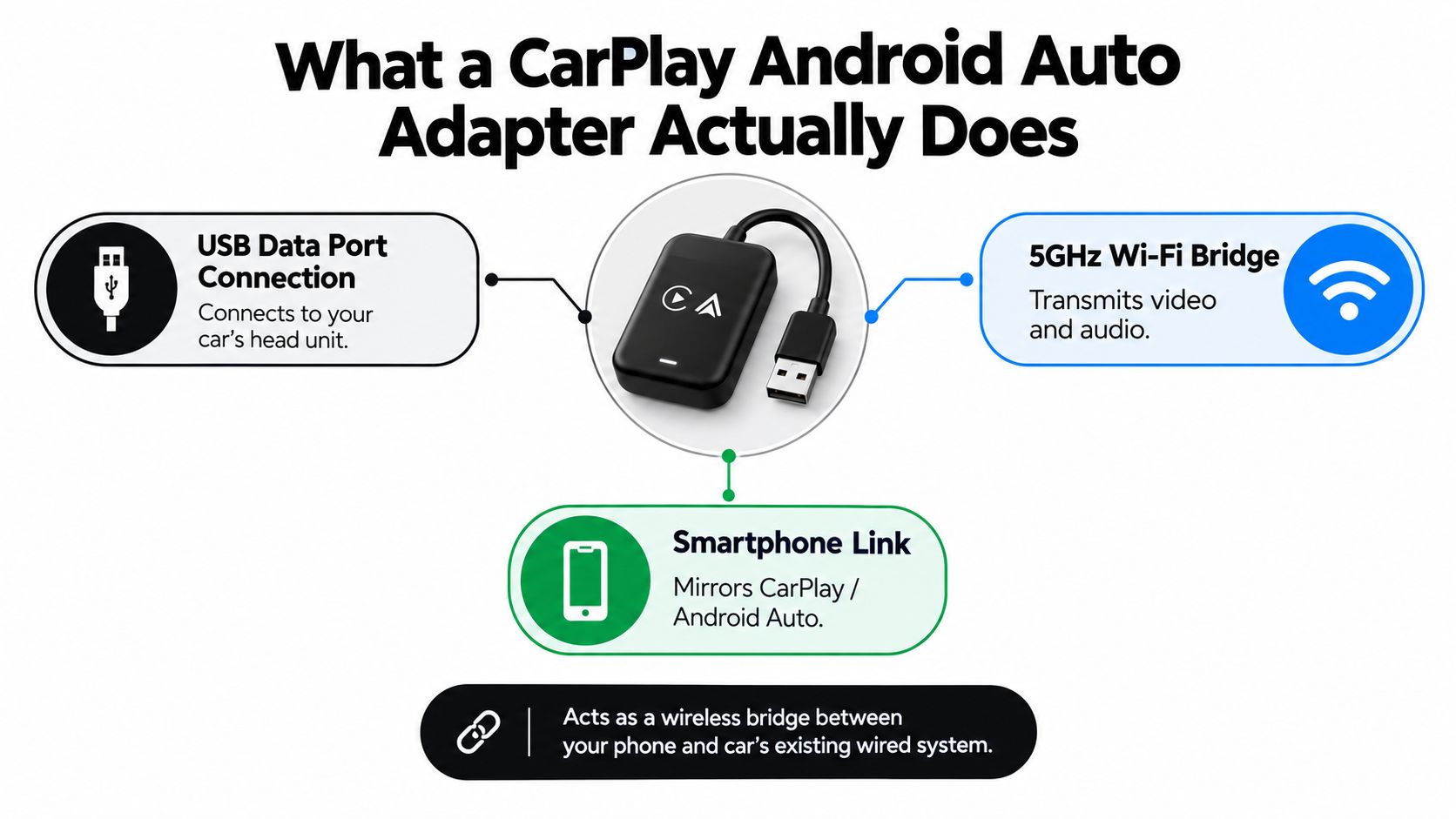
This technical explanation of wireless CarPlay connectivity describes why the adapter creates a direct, short-range, high-bandwidth link inside the vehicle. Your phone is not using the adapter to join your home internet network. It is establishing a direct projection connection.
Why the adapter can feel almost wired
The adapter does not cast a generic phone video to the display. It joins the projection system the head unit already understands, so navigation and music retain their familiar controls once the session begins.
The adapter still adds a processing step. It receives wireless data, processes it, and sends the projection session to the head unit over USB. Startup and touch response can therefore be slightly slower than with a direct cable, although a well-made unit usually keeps that delay unobtrusive.
Before choosing a model, compare CarPlay and Android Auto to see how phone compatibility, apps, voice controls, calls, and navigation differ.
The Installed Base That Made Adapters a Market
A driver can have a screen, steering-wheel controls, and a USB port ready for phone projection, yet still plug in a cable before every trip. That routine became common because many vehicles adopted wired CarPlay or Android Auto before wireless projection became standard. The adapter market grew around that practical gap. Owners did not need a new radio. They needed a small device that could replace the repeated physical connection.
Omdia's U.S. vehicle survey found Android Auto availability rising from 34.6% on 2017 model-year vehicles to 91.9% in its midyear 2023-model survey. Apple CarPlay increased from 35.2% to 93.9% over the same span. Omdia's vehicle availability data shows how a large installed base of compatible screens created room for an accessory that changes the connection method without replacing the head unit.
Separate market reporting described CarPlay as available in nearly all new cars sold in the United States by 2025. That does not mean every vehicle needs a wireless adapter. It does show that smartphone projection has moved from a specialist feature into a normal part of the vehicle electronics buyers already own.
Why drivers keep using the systems
Availability creates the opportunity, but regular use sustains it. Edison Research found that 32% of Americans had CarPlay or Android Auto in their primary vehicle in 2024, compared with 26% in 2023. Among people with access, 83% actively used the systems while driving. These figures appear in the CarPlay and Android Auto adapter market overview.
The same report estimated the global wireless CarPlay adapter market at about $1.2 billion in 2024, with a projection of $4.6 billion by 2033 at a 15.8% CAGR. Another estimate placed the market at $1.8 billion in 2025. The estimates use different methods, so they should not be combined into one exact market size. Their broader message is clearer: drivers repeatedly use projection systems, and many will pay for a less repetitive way to connect.
| Market signal | Practical takeaway |
|---|---|
| Wired projection became common before wireless projection | Many owners already have the expensive part, the compatible head unit |
| Access often leads to regular use | Removing the cable addresses a repeated daily annoyance |
| Wireless adapter estimates vary | Treat market totals as directional, not as one precise measurement |
| New vehicles increasingly include phone projection | The accessory can extend the useful life of an existing radio |
The opportunity also reaches beyond sedans. A daily driver may need only a compact dongle, while a golf cart or UTV may start with no projection-capable head unit at all. That buyer may need an aftermarket display, a stable power source, and wiring suited to a vehicle with different electrical conditions. A fast-growing group of adapter buyers is therefore solving a retrofit problem, not merely removing a cable.
In both cases, the goal is similar: keep a familiar phone interface while making the vehicle easier to use. The hardware path differs, and that difference matters before anyone orders an adapter.
Head Unit Compatibility and the Wired-Only Rule
The most important compatibility rule is also the easiest to miss: a wireless adapter requires wired CarPlay or wired Android Auto already working in the head unit. The dongle replaces the physical phone connection. It doesn't add the underlying projection software to a radio that has never supported it.
Start with the radio, not the phone. Connect the phone directly with a known-good data cable and check whether CarPlay or Android Auto launches. If the wired connection fails, a wireless dongle is unlikely to solve the problem.
Wireless Android Auto also has a platform requirement that appears in adapter manuals. The manual for one combined CarPlay and Android Auto adapter identifies Android 11 or newer as the common requirement for wireless Android Auto support, so Android users should verify the phone version before ordering. CarPlay compatibility depends on the iPhone, iOS version, head unit, and adapter firmware working together.
A checklist for cars, carts, and UTVs
| Requirement | Minimum | Ideal | Blocks Adapter? |
|---|---|---|---|
| Projection support | Wired CarPlay or wired Android Auto | Both wired systems supported | Yes, if absent |
| USB connection | A USB data port assigned to phone projection | Clearly labeled, reliable data port | Yes, if charge-only |
| Android phone | Compatible Android version, commonly Android 11 or newer for wireless Android Auto | Current supported Android release | Often, if too old |
| Head-unit software | CarPlay or Android Auto enabled | Updated firmware and clean phone profiles | Sometimes |
| Vehicle power | Stable power to the head unit and USB port | Reliable supply during ignition and shutdown | Yes, if the port resets or starves the adapter |
A golf cart or UTV can satisfy the same rule, but the factory vehicle may not. Many niche vehicles use an aftermarket touchscreen radio, and that radio must provide wired projection before the dongle has anything to bridge. A golf cart dashboard guide can help you think through screen placement, controls, and the distinction between adding a display and adding phone projection.
Common rejection points
A disabled CarPlay toggle can make a compatible radio look incompatible. Old head-unit firmware can also fail authentication, while a loose or unsuitable USB cable can interrupt the wired side of the bridge. If the adapter connects to the phone but nothing launches, check the radio's projection setting, delete old phone profiles, and test the direct wired connection again.
Golf cart owners should inspect the installation more closely than a typical car buyer. Confirm which USB port belongs to the head unit, whether the radio receives stable power while the cart is moving, and whether the screen is part of a genuine projection-capable system rather than a display that only plays local media.
Wired, Wireless, OEM, and Retrofit Compared
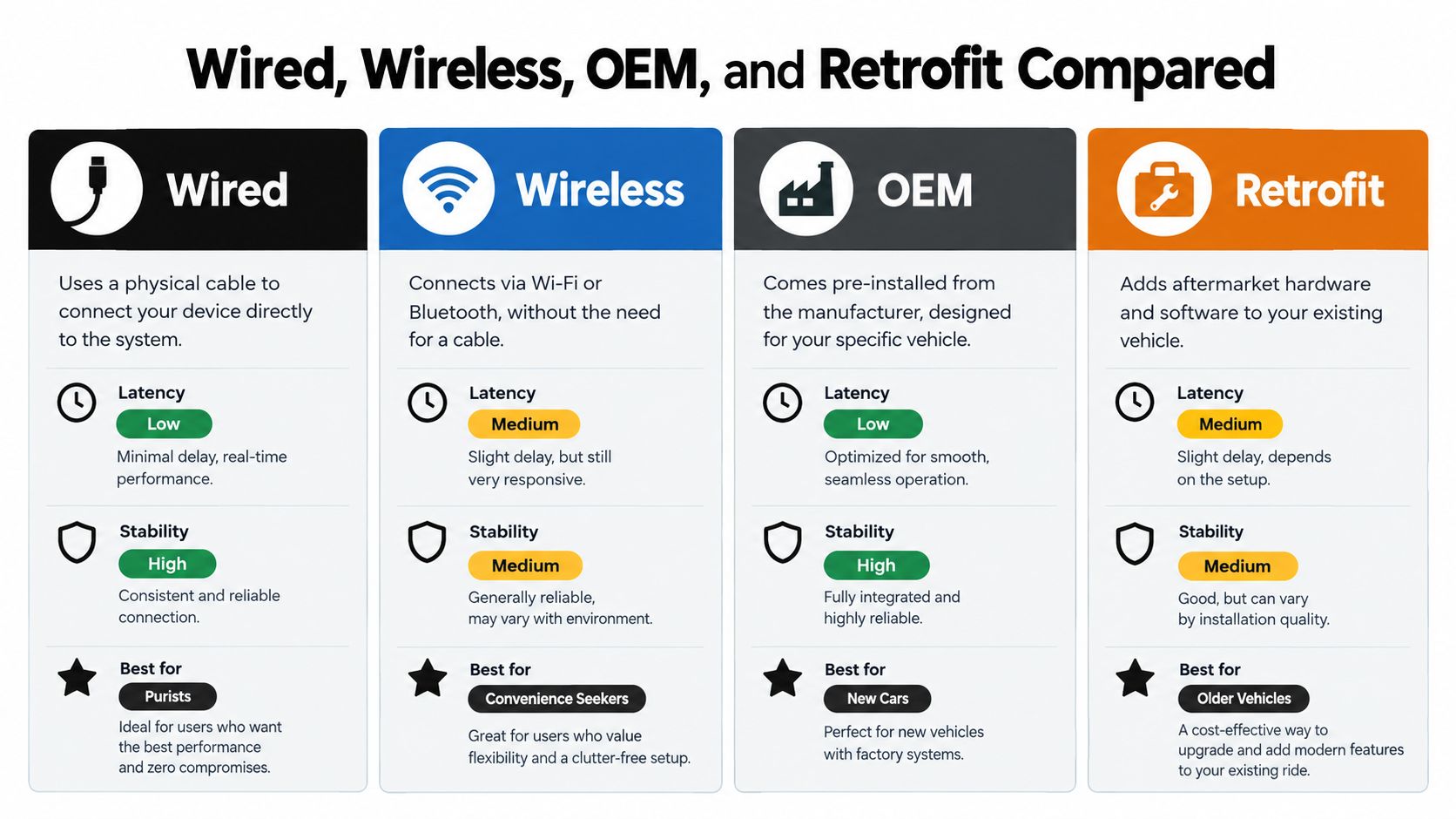
There are four sensible configurations, and each solves a different problem.
Wired CarPlay or Android Auto remains the straightforward choice when stability and the lowest possible latency matter most. The phone connects directly to the head unit, so there's no adapter to power, pair, update, or mount. The drawback is the cable, especially for short trips where the driver wants to start moving without arranging the phone lead.
A wireless adapter keeps the existing radio and removes that cable from the routine. It adds another device and a small amount of connection overhead, but it's usually the least disruptive upgrade when wired projection already works. A dual-band design is preferable because the high-bandwidth Wi-Fi link is less likely to struggle than a design limited to a more congested connection.
Match the setup to the vehicle
OEM wireless integration arrives as part of the vehicle's original infotainment system. It usually offers the cleanest physical installation, but owners have limited upgrade options if the vehicle shipped with wired projection only. Factory systems also tend to be tightly tied to the vehicle's firmware and controls.
A retrofit head unit replaces the original radio. That's a bigger project, but it can be the only practical route for an older vehicle or a golf cart that never had a projection-capable head unit. Retrofit systems can also provide the screen, audio routing, camera input, and wiring features that a small USB dongle cannot supply.
Budget and premium adapters differ less in their basic concept than in execution. Better units typically offer more dependable 5 GHz behavior, cleaner reconnection logic, and firmware support that addresses phone and head-unit changes. Cheaper units may work well in a simple setup, but recurring dropouts or unreliable startup can erase the initial saving.
| Configuration | Best fit | Main advantage | Main compromise |
|---|---|---|---|
| Wired | Drivers who prioritize direct operation | Stable, low-latency connection | Cable required |
| Wireless adapter | Vehicles with working wired projection | Keeps the existing radio and removes the phone cable | Adds pairing, Wi-Fi, and firmware variables |
| OEM wireless | New vehicles with factory support | Integrated installation | Limited retrofit flexibility |
| Retrofit head unit | Older vehicles, carts, and UTVs without projection | Adds the underlying compatible system | Requires physical replacement and wiring |
This shift toward connected, software-defined vehicle experiences sits within the wider set of innovations shaping the UK motor trade, where buyers increasingly compare not only engines and batteries but also interfaces, connectivity, and upgrade paths.
Installation From First Plug-In to First Connection
Installation is usually simple when the right USB port and compatible head unit are already in place. The mistakes happen when owners rush the first connection or assume every USB socket carries the same kind of signal.
Follow the connection sequence
- Find the projection USB port. Look for a phone symbol or the port used by wired CarPlay or Android Auto. A charge-only socket can power the dongle without giving the radio a data connection.
- Plug in the adapter directly. Avoid adding a USB hub or an unverified extension during setup. Give the adapter time to boot while the head unit is fully awake.
- Confirm the projection setting. Open the head unit's phone or connectivity menu and make sure CarPlay or Android Auto is enabled.
- Pair over Bluetooth first. Select the adapter from the phone's Bluetooth menu. The adapter then handles the Wi-Fi handoff for the projection session.
- Accept the prompts. Allow the phone to use CarPlay or Android Auto, then select the correct audio source on the head unit.
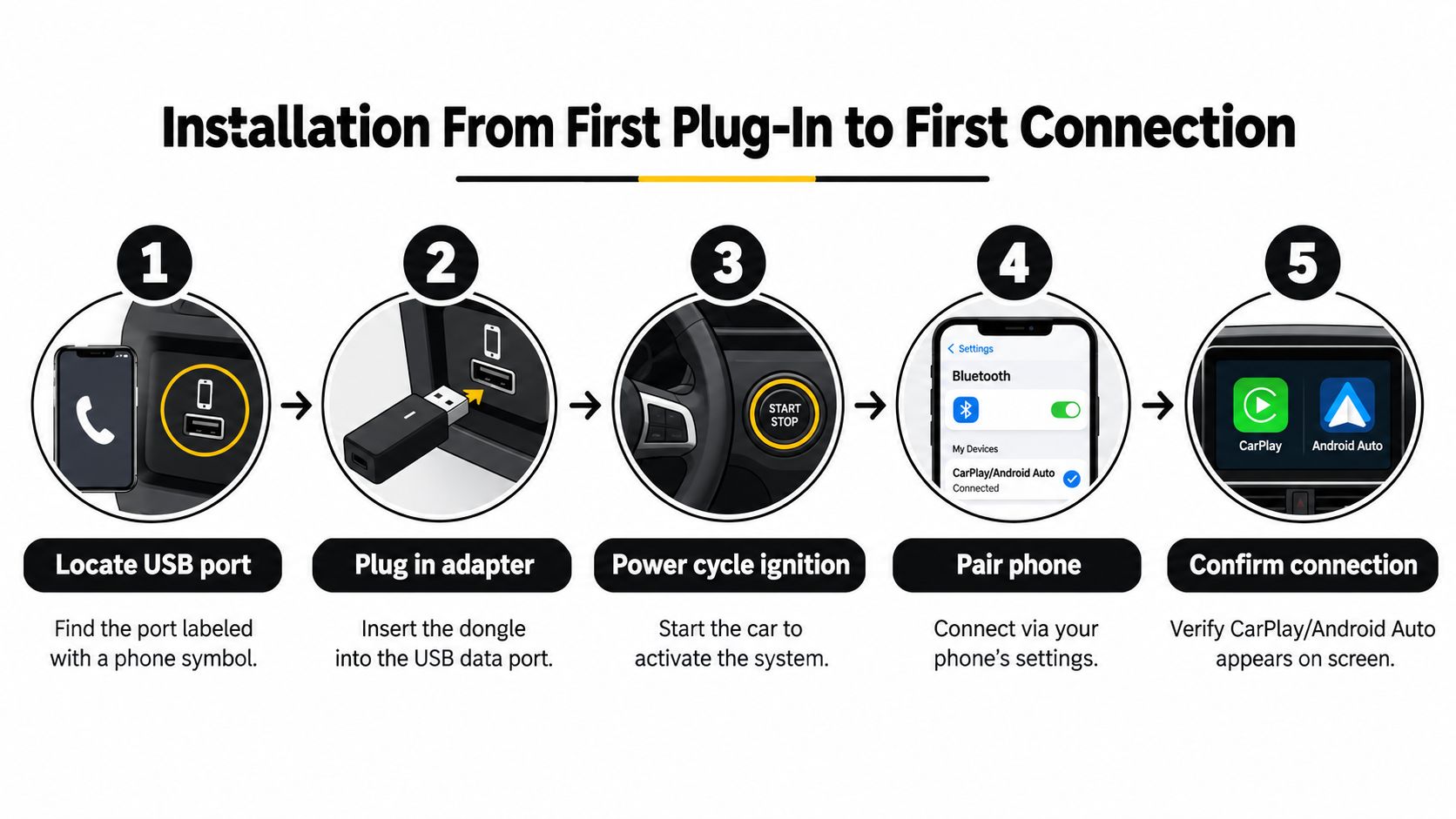
A first connection can take longer than later reconnects because the phone and adapter need to exchange credentials and establish the projection session. If the screen stays blank, don't keep tapping the phone. Work through the chain: USB data port, head-unit setting, Bluetooth pairing, Wi-Fi handoff, and audio source.
Check the software before judging the hardware
Many adapters provide firmware updates through a companion app or a browser-based settings page. Install the update according to the manufacturer's instructions, then remove old phone profiles and pair again if the adapter still loops during startup.
A vehicle may also shut down its USB port after the ignition turns off. That behavior can make the next startup look inconsistent, especially in a cart or UTV with a custom power circuit. If you're combining a new screen with a camera, review the wiring and audio path in this guide to a touch-screen radio with a backup camera.
A healthy first connection has a recognizable pattern:
- The adapter powers on without repeatedly restarting.
- The phone pairs by Bluetooth without manual Wi-Fi password entry.
- The projection interface appears on the head unit.
- Touch controls respond without persistent freezing.
- Navigation voice and music use the intended vehicle speakers.
- The connection returns after the next ignition cycle without deleting and recreating the profile.
Wi-Fi Tradeoffs, Dropouts, and Real Fixes
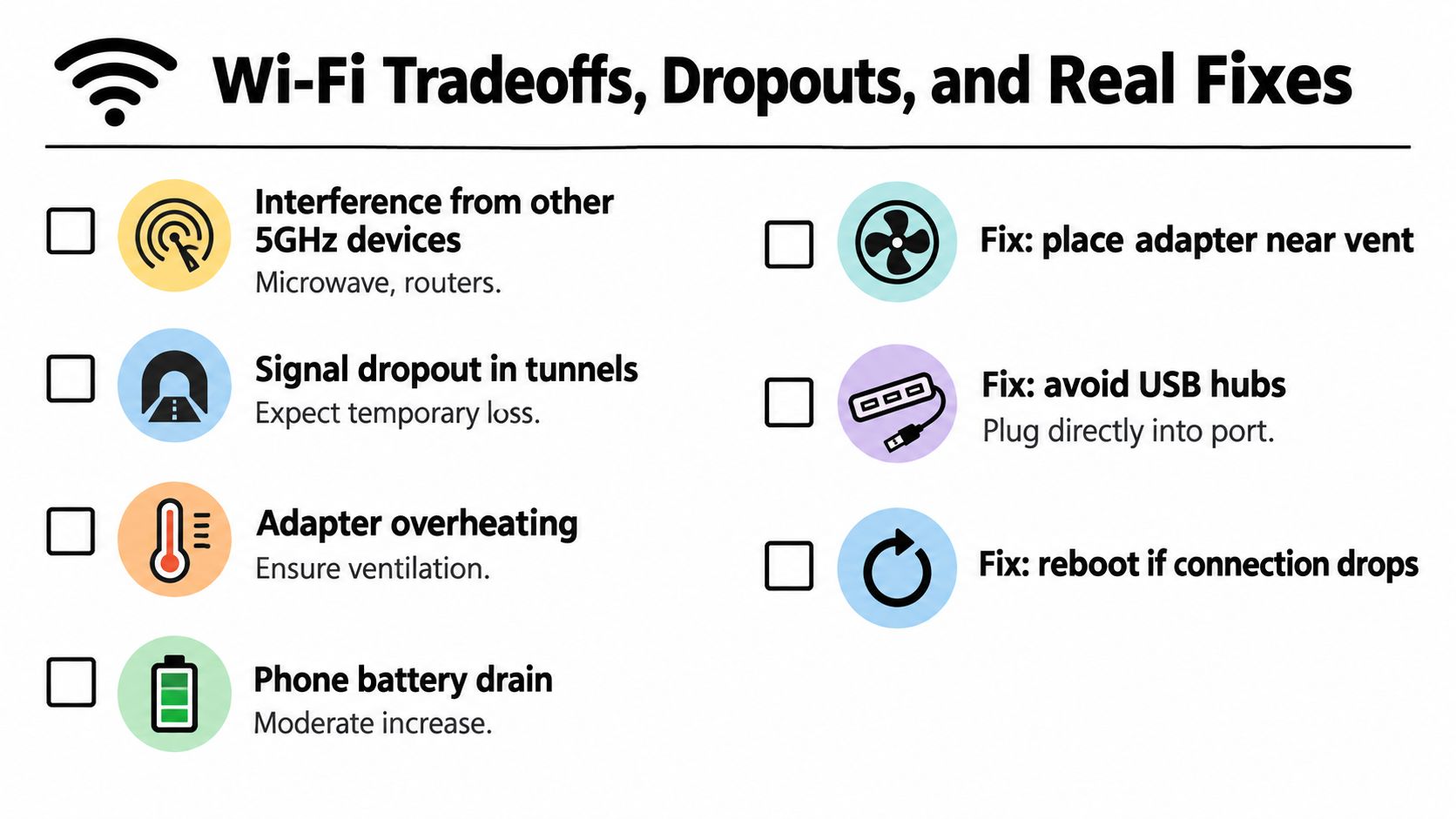
Wireless projection uses Wi-Fi as a direct link between the phone and adapter, not only as an internet connection. That link carries the interface, maps, and audio to the head unit. An independent adapter manual warns that wireless Android Auto can occupy the phone's Wi-Fi connection, so the phone may not use that same connection for another Wi-Fi task at the same time.
The phone can still use mobile data for normal online services, but its Wi-Fi radio is busy maintaining the projection session. A passenger may also notice different network behavior when trying to connect the phone to another Wi-Fi setup. This tradeoff matters even more in a golf cart or UTV, where the adapter may sit near exposed wiring, metal brackets, or other electrical equipment.
Fix the failure in the layer where it starts
The phone connects but the screen never launches. Remove the adapter from the phone's Bluetooth list and the vehicle's projection settings. Restart both devices, then pair again from the head unit's CarPlay or Android Auto menu. Bluetooth starts the discovery process, while Wi-Fi carries the active session, so both stages must finish.
The connection drops during driving. Try the adapter in the correct USB port and connect it directly rather than through a hub. Check that the port supplies steady power. In a golf cart or UTV, inspect connectors, grounds, and custom wiring. Vibration or a loose power connection can interrupt a link that stays stable in a passenger car.
The interface lags or stutters. Move the adapter away from enclosed metal spaces, install available firmware updates, and reduce nearby wireless traffic while testing. Dual-band designs using 5 GHz for projection generally have a better chance of keeping this high-bandwidth connection smooth than designs limited to 2.4 GHz.
The adapter reconnects in a loop. Delete old phone profiles from both the adapter and head unit, reboot the head unit, and complete a clean Bluetooth pairing. If the loop began after a phone operating-system update, check adapter firmware and head-unit updates before replacing the hardware.
A short interruption in a busy wireless environment does not automatically mean the dongle has failed. Repeated dropouts in different locations, after clean pairing and current firmware, point more strongly to power, compatibility, or hardware trouble.
Choosing the Right Adapter for Your Vehicle
Start with one question: does the head unit already run wired CarPlay or wired Android Auto? If the answer is no, skip USB dongles and look for a compatible retrofit screen or head unit instead.
Then match the adapter to the environment. A daily commuter benefits from quick reconnection, clear firmware support, and a compact design. A cart or UTV needs more attention to mounting, vibration, dust, and the quality of the vehicle's power circuit. The adapter's wireless specifications matter, but they can't compensate for a radio or USB port that doesn't provide the underlying wired projection connection.
Check the phone before you order. Android users should verify that the device meets the adapter's wireless Android Auto requirement, commonly Android 11 or newer in the manuals cited by this adapter compatibility guide. iPhone users should confirm that the specific adapter supports their iPhone and iOS combination.
Finally, judge the vendor by its update process, not only by the first connection. A product with documented firmware updates and clear reset instructions is easier to keep working when the phone, head unit, or projection software changes.
Solana EV offers street-legal golf carts and electric UTVs with built-in Apple CarPlay and Android Auto on a touchscreen, which avoids the retrofit compatibility puzzle faced by owners of older carts. Visit Solana EV to explore its vehicles, find a dealer, or see how integrated phone projection fits your next off-road or neighborhood vehicle.