
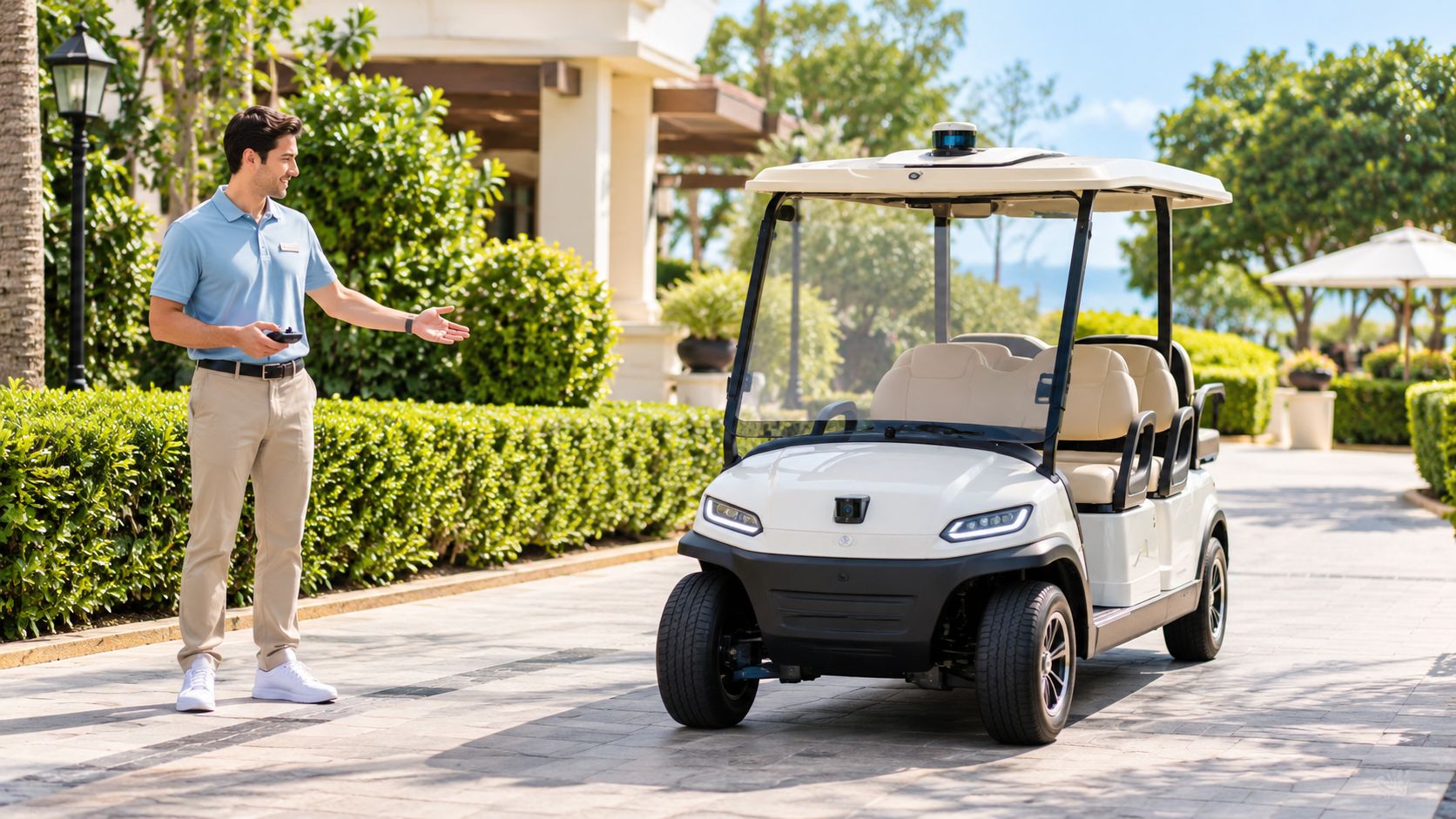
A resort employee is standing beside a row of electric carts, trying to move one out of a crowded staging area without climbing in, starting it, reversing, stepping out, and repeating the process for the next vehicle. In a gated community, a homeowner may face a similar problem while guiding a cart out of a tight garage. Electric golf carts remote control systems promise a simpler answer: move the vehicle from a short distance with a handset or app, then take manual control whenever the surroundings demand closer attention.
The timing makes sense. Electric golf carts have expanded from a niche course vehicle into a sizable global category. Market estimates for 2025 range from about USD 1.4 billion to USD 1.55 billion, with projections reaching roughly USD 2.58 billion to USD 3.3 billion by 2033 to 2035, depending on the research firm, as reported in the electric golf cart market outlook from Global Market Insights. As carts add electronic controllers, connected accessories, displays, alarms, and fleet tools, remote movement becomes easier to integrate than it would be on a purely mechanical vehicle.
Remote operation still has clear boundaries. It isn't long-distance teleoperation, and it shouldn't be treated like a driverless road vehicle. Most systems are designed for short-range, low-speed movement, especially in places such as resorts, campuses, maintenance yards, golf facilities, and private neighborhoods.
This guide explains the system from the inside out. You'll learn how the wireless command reaches the cart, why range changes across real properties, what happens during signal loss, how aftermarket kits compare with integrated systems, and which operating rules make sense for guests, staff, residents, and pedestrians.
Table of Contents
- Introduction to Remote Control for Electric Golf Carts
- How Remote Control Actually Works on an Electric Cart
- OEM Integrated Systems Versus Aftermarket Remote Kits
- Range Limits and What Happens When Signal Is Lost
- Safety Features and Smart Operating Rules
- Where Remote Control Adds Real Value and Where It Does Not
- Choosing and Using Remote Control With Confidence
Introduction to Remote Control for Electric Golf Carts
A resort team needs to move an empty cart before the next guest arrives. Driving it manually means climbing in, starting it, repositioning it, and getting out again. A remote can handle that short movement while the operator stands where the cart's corners and path are easier to see. The same arrangement helps a maintenance manager position a vehicle around a service yard or a homeowner move one from storage.
The operator still decides when and where the cart moves. The remote removes some physical steps, including entering, starting, steering, and exiting. It does not turn the cart into an unattended vehicle. Treat remote control as an assistance feature, with a person watching the cart and ready to stop it.
Why electric carts suit remote operation
An electric cart already uses electronic controls to regulate motor output. A remote kit adds a wireless input, a receiver, and circuitry or software that interprets commands such as forward, reverse, turning, stopping, or speed adjustment. The arrangement resembles adding a wireless control layer to the cart's existing electronic system.
That design fits the broader growth of electric mobility, which is why remote control now appears in conversations about resort fleets, campuses, gated communities, and private properties. Earlier market estimates already show a growing electric golf cart category, although market projections vary by research firm and do not predict the performance of any particular cart or remote system.
The practical question is reliability, not just advertised range. A signal can weaken behind buildings, trees, parked vehicles, or other obstructions. Electrical equipment and nearby wireless systems may also interfere with communication. An operator should know whether the cart stops immediately, slows to a stop, or follows another programmed response when the signal is interrupted. That behavior should be tested on the actual property, not assumed from a brochure.
Operating policy matters just as much. A resort may permit remote movement only in empty staging areas, while a gated community may require a visible operator, a clear path, and manual control near residents or visitors. Staff should also know where remote use is prohibited, such as steep slopes, water edges, crowded parking areas, and mixed-traffic routes.
What this guide will help you decide
Use these questions before choosing a system:
- Can the operator see the cart and its full path?
- What does the cart do when the signal disappears?
- Where do buildings, trees, vehicles, and power lines affect communication?
- Can the operator switch to manual control without delay?
- Can the property support installation checks, maintenance, and staff training?
These answers help determine whether remote control fits a course, resort, campus, gated community, or private driveway.
How Remote Control Actually Works on an Electric Cart
A resort worker stands beside a staging area, with a clear view of an empty path. One button on the handset starts the cart, but that instruction must pass through several electronic checks before the wheels move. Remote control is therefore a communication chain, not a wireless on/off switch.
The command path
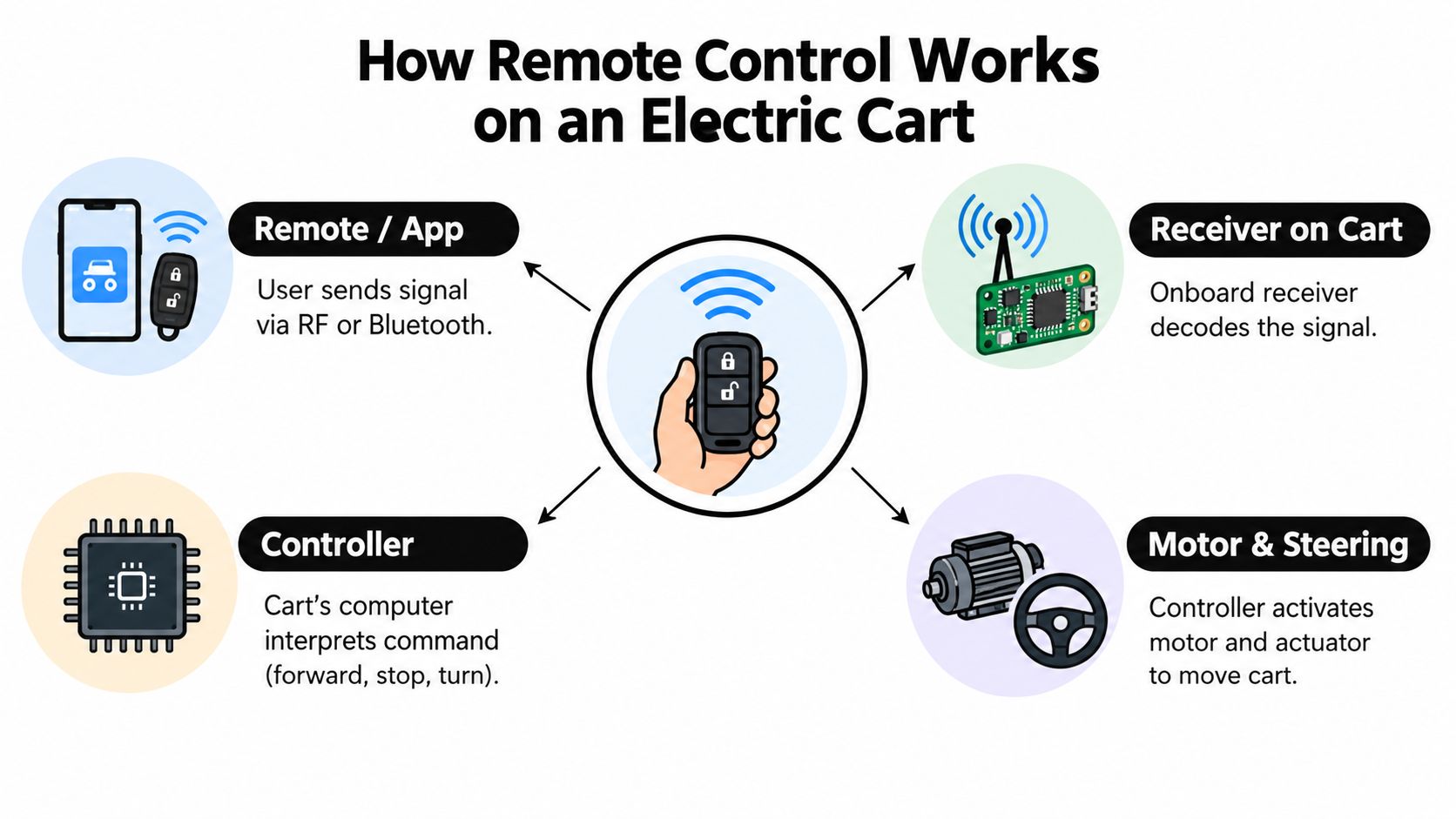
The movement usually follows this sequence:
- Handset or app: The operator presses a control or selects an instruction on a phone-based interface.
- Wireless receiver: A receiver on the cart detects and decodes the signal.
- Vehicle controller: The controller checks the command and converts it into electrical output. The golf cart controller guide from Solana EV explains this part of the system.
- Motor and steering hardware: The motor receives the drive instruction, while an actuator or steering mechanism changes direction.
- Safety logic: The system watches the communication link and applies its programmed stop behavior if the expected signal disappears.
The controller works like a traffic coordinator. It determines how an electronic instruction becomes usable motor movement, while the receiver provides the message and the motor supplies the response.
Radio, Bluetooth, and app control
A dedicated radio-frequency handset can send direct commands without requiring a phone screen. Bluetooth systems connect to a nearby mobile device or accessory. App-based systems may also show settings, status information, or other connected functions.
The connection method changes how staff operate the cart, but every approach still needs a receiver, controller, motor control, and steering hardware. Radio links can also weaken behind buildings, trees, parked vehicles, or other obstructions. Nearby electrical equipment and wireless systems may add interference. For a resort or gated community, the important test is whether the cart stops, slows, or follows another programmed response when communication is interrupted.
A commercially distributed remote golf cart controller filed with the U.S. Federal Communications Commission states compliance with FCC Part 15, the framework for low-power, unlicensed radio equipment, as shown in the FCC-filed user guide.
Core safety principle: A remote command should produce controlled, low-speed movement only while the operator can observe the cart and its route.
Low-speed operation gives the operator more time to respond than high-speed vehicle teleoperation. A published remotely operated vehicle study found remote control was reliable mainly in the 0 to 20 km/h range, according to research hosted by NIST. That finding does not make every cart safe in every setting. It explains why low-speed carts suit remote assistance, provided the property has a clear path, trained operators, and a tested response to signal loss.
OEM Integrated Systems Versus Aftermarket Remote Kits
A resort cart stops responding near a service building, and staff must decide whether the problem is the handset, the receiver, the steering actuator, or the cart's original controller. That diagnosis is usually easier when the remote function was designed with the vehicle. A retrofit can work well, but it adds another control layer that the owner must install, inspect, and support.
The purchasing question is therefore how the remote feature is connected to the vehicle. An OEM integrated system is developed around the cart's controller, displays, interlocks, wiring, and service procedures. An aftermarket kit is added to a vehicle that may not have been designed for remote steering or throttle input. The choice affects installation, troubleshooting, documentation, training, and responsibility across a fleet.
Factory integration
An OEM system can be included in the vehicle's control architecture from the beginning. The manufacturer can coordinate remote commands with the accelerator, braking behavior, steering actuator, parking controls, key system, and other interlocks. Connected displays and vehicle software may also show system status in one interface.
Integration improves consistency, but it does not answer every operating question. A manager still needs to confirm how the feature works, which conditions disable it, how signal loss is handled, and who trains operators. A defined vehicle platform can make fleet configuration, servicing, and documentation more consistent than a collection of unrelated components.
Connected features such as touchscreen media, Apple CarPlay, and Android Auto fit this broader OEM approach. They do not show that the vehicle supports remote driving. Buyers should request explicit confirmation of remote-control capability instead of treating general connectivity as proof.
Retrofitting an existing cart
An aftermarket kit may suit an owner who already has compatible electric carts and wants to add remote operation without replacing the fleet. Depending on the design, installation may involve a remote throttle control, steering hardware, receiver, wiring changes, and a revised safety arrangement.
The handset pairing successfully, however, does not confirm that the complete system is ready for service. A mismatched actuator, exposed connector, poorly protected wiring, or unclear emergency-stop procedure can create trouble during daily use. Installation should be inspected on the actual cart, including manual controls, steering response, braking, and the response to a lost command link. Warranty terms may also become more complicated if the modification changes the original control system or requires cutting factory wiring.
| Feature | OEM Integrated | Aftermarket Kit |
|---|---|---|
| Vehicle integration | Designed around the original controller and safety architecture | Added to an existing vehicle and may require adapters or new actuators |
| Installation | Usually handled through the manufacturer or an authorized dealer | Depends heavily on installer skill and kit instructions |
| Feature depth | May coordinate remote commands with displays, locks, interlocks, and connected systems | Often focuses on core movement functions, with features varying by kit |
| Warranty | More likely to follow a defined manufacturer support path | Requires careful review of both cart and kit warranty terms |
| Fleet service | Easier to standardize when all vehicles share one platform | Can become varied if different carts receive different kits |
| Best fit | New purchases, managed fleets, and operators prioritizing consistent support | Existing carts, pilot programs, and owners with qualified installation support |
A practical selection rule
Choose an integrated system when carts will serve a managed property with multiple users, formal training, and ongoing service requirements. A retrofit can fit an existing fleet when the vehicle is compatible, the installation can be properly inspected, and the operator accepts responsibility for validating the complete system.
Ask for wiring diagrams, fail-safe behavior, service access, replacement-part support, and a live demonstration on the terrain where the cart will operate. Test the full chain, from the handset command to steering and stopping, rather than judging the system by pairing speed alone.
Range Limits and What Happens When Signal Is Lost
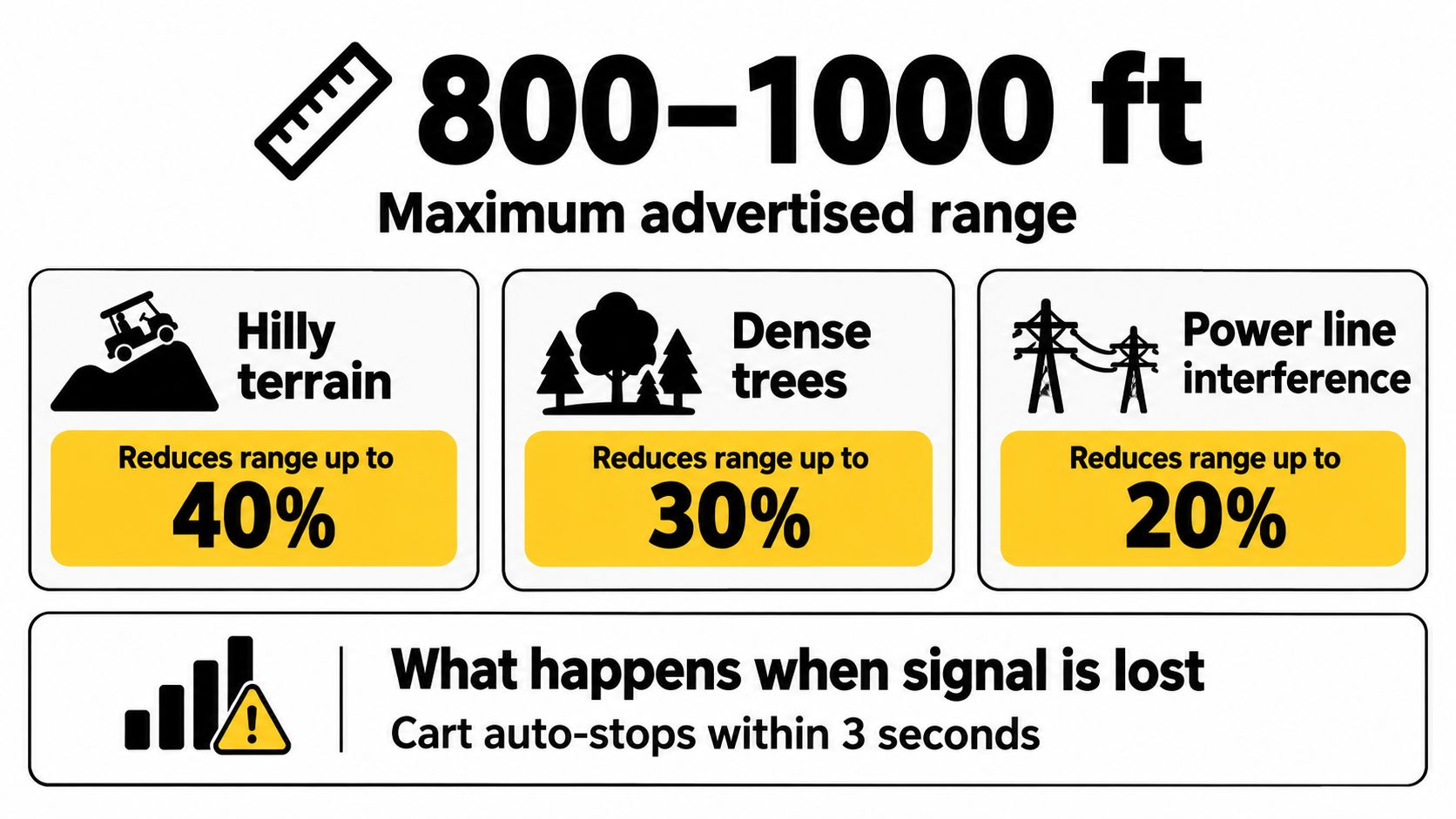
A cart may respond perfectly in an open lawn, then hesitate beside a maintenance building or behind a tree line. Range is therefore a site condition, not just a product specification. Documentation lists about 70 yards for one push-cart remote, about 90 meters for a dedicated golf-cart remote, and 100 meters or more for another platform, as shown in the documented remote-control specifications. These figures apply to particular products and test conditions, so they do not promise the same result at every property.
Why a clear test area can mislead you
Wireless signals usually perform better across open grass than along a resort service lane surrounded by structures. Hills can block line of sight, while trees and landscaping can absorb or scatter the signal. Power lines, electrical equipment, phones, vehicles, walls, fences, and other obstructions may reduce usable performance or create interference.
Some manuals warn that real-world range can fall below an advertised 50 meters because of hills, trees, electromagnetic interference, cellular phones, power lines, and obstructions. Treat that figure as a reason to test, not as a correction factor to calculate. A short on-site trial is more useful than a theoretical range estimate.
Test with the cart visible and hold the remote as operators will normally hold it. Leave the surrounding environment in its usual condition, then check the staging lane, parking area, slope, tree line, and service route. Record where response becomes inconsistent and set a shorter operating boundary with a clear margin.
Signal loss needs a defined response
A responsible system needs a fail-safe response when its receiver stops receiving a valid command. In practical systems, the cart stops, but the operator still needs to know whether that stop is immediate, controlled, or delayed briefly. Verify the behavior during commissioning and document the result for staff.
Use manual control in car parks, on steep slopes, and in crowded or confined spaces. A blocked line of sight or brief interference can matter more in those locations than the advertised range. For properties that combine carts with gates and access controls, South Wales gate repair tips offer a useful reminder to maintain sensors, access points, and surrounding areas, although gate systems and cart remotes remain separate technologies.
A fleet operator can pair remote operation with golf cart GPS tracking to record vehicle location and usage. Tracking supports fleet oversight, but it does not replace supervision, range testing, or confirmation of the cart's stop response. The operating policy should define all three.
Safety Features and Smart Operating Rules
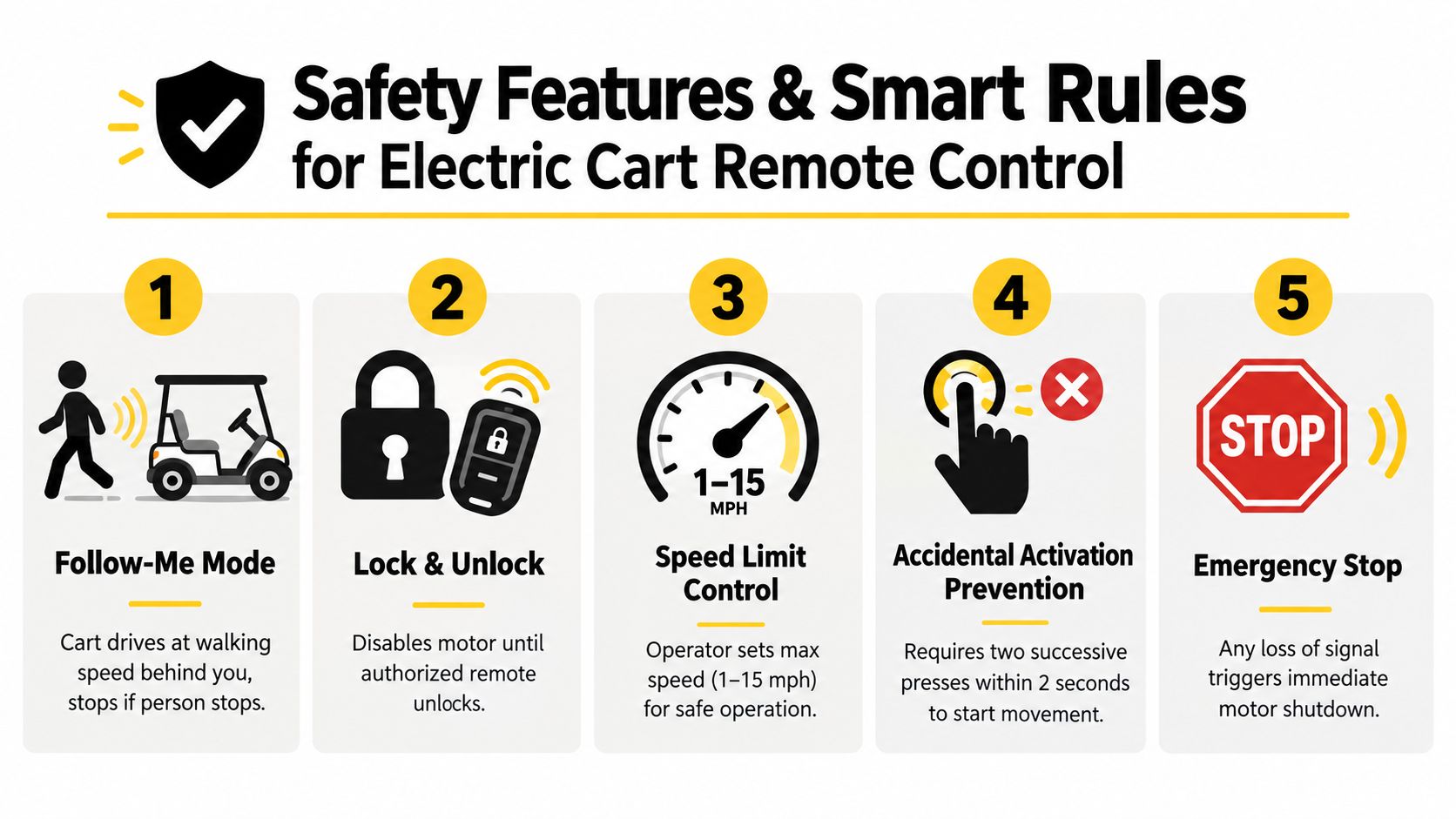
A cart is moving near guests, a slope, or parked vehicles. In that moment, a remote feature is only as safe as its operating rule. Follow-me mode, locking, speed limits, and stop controls can reduce risk, but each one addresses a different part of the problem. Staff need to know what the feature does, where it is permitted, and which conditions require manual driving.
A handset carried loosely in a pocket can receive an accidental command. Follow-me may work in an open staging area yet create more risk beside water, children, traffic, or an incline. Locking can restrict ordinary activation, while physical key control, supervision, and site access procedures still protect the cart when it is unattended.
Build rules around people and places
User documentation commonly covers remote locking, pairing and unpairing, speed control, and smart follow-me operation. It also advises keeping the remote out of pockets, switching to manual control near pedestrians, and supervising the cart around slopes, water, and parking areas, as described in the remote cart operating guide.
Turn those instructions into site policy. A manual may explain the controls, but a resort or gated community must define the places, people, and situations in which remote operation is allowed.
- Use follow-me only in approved zones: Begin with open, controlled areas where the operator can see the full route.
- Keep manual control near guests: Drive manually where pedestrians, children, cyclists, or service vehicles share the path.
- Secure the handset: Store it where buttons cannot be pressed accidentally. Require staff to follow pairing and unpairing procedures.
- Set a conservative boundary: Mark remote-prohibited areas, including loading points, steep edges, water features, and narrow parking lanes.
- Train for the stop response: Each operator should know how to stop the cart from the handset and what the cart does after communication is interrupted.
- Record exceptions: Remove a cart from remote service if it behaves unexpectedly, then identify the cause before returning it to operation.
Treat connected security as part of the operating picture
Remote movement is only one control point. Managers also need rules for unauthorized use, handset storage, battery charging, and access after working hours. Guidance on vehicle security for parents can help owners review general vehicle-security habits, while a cart fleet still needs procedures suited to its own keys, remotes, and staff roles.
A clear policy keeps responsibility with the operator: remote operation is allowed only when the operator remains responsible for the cart's path. Remote control can reduce walking and repositioning effort, but it does not make the cart autonomous or transfer responsibility to software.
A dedicated golf cart alarm system may support the wider security plan. An alarm addresses unauthorized access or movement, whereas the remote system must still validate commands and respond correctly when its signal is interrupted. Managers should test both functions separately and document who may use each control.
Where Remote Control Adds Real Value and Where It Does Not
A resort crew preparing for guest arrival may need to place several empty carts in a pickup line. If the route is visible, short, and free of pedestrians, remote control can handle that repeated positioning without an operator climbing into and out of each vehicle. The same principle applies to a campus maintenance yard or an event setup area, provided a trained operator remains close enough to stop the cart.
Strong use cases
Remote operation fits properties with:
- Open staging zones: The operator can see the cart, its route, and nearby people.
- Repeatable short movements: Staff perform the same repositioning task regularly.
- Low pedestrian density: The cart is separated from unpredictable foot traffic.
- Trained operators: Users know when remote mode is appropriate and when direct driving is safer.
- Clear vehicle ownership: A supervisor can inspect the system, manage handset access, and remove a cart from service.
The practical benefit is reduced friction, not autonomy. Fewer entry and exit cycles may simplify staging. Positioning carts around a service yard may also take less effort. Those gains depend on the property, so managers should observe the current workflow and compare it with the added charging, testing, and access-control duties.
Signal behavior also matters. A route that looks open may still contain concrete walls, metal structures, parked vehicles, or other radio equipment that weakens communication. The operator should test the actual path and know whether the cart stops, slows, or continues under the system's signal-loss rule. That response is part of the use case, not a minor specification.
Situations where manual driving wins
Direct control is usually safer in narrow lanes, busy parking areas, crowded events, steep slopes, and locations where guests may enter the cart's path without warning. Manual driving also gives the operator better judgment around curbs, gates, parked vehicles, landscaping, and surfaces that could be damaged by a poorly aligned cart.
The same test applies in a gated community or private driveway. A controlled entrance can still contain a blind corner, a child crossing the route, or a vehicle moving across it. If the operator cannot see the full path or respond immediately, remote control has added complexity without a matching operational benefit.
Match the system to the property
Before approving a purchase, ask:
- Terrain: Is the route open and predictable, or does it include slopes, trees, structures, and tight turns?
- Traffic mix: Will trained staff work alone, or will guests, residents, children, cyclists, and vehicles share the area?
- Staffing: Who tests the system, trains users, stores the remotes, and removes a cart from service when its behavior seems wrong?
Remote control adds value when supervision is direct and movements are repeatable. It adds risk and workload when the cart must travel beyond the operator's view, operate near changing traffic, or depend on a signal that has not been tested throughout the property.
Choosing and Using Remote Control With Confidence
A good buying decision comes down to three linked choices. First, select the system architecture, OEM integrated or aftermarket, based on the vehicle, service model, and responsibility you can support. Second, treat advertised range as a starting point, then test line of sight on the property. Third, write the operating policy before guests or employees use the feature.
Use a live evaluation
Ask a dealer or installer to demonstrate the complete behavior, not just pairing:
- Command control: Check forward, reverse, steering, speed adjustment, and stop behavior.
- Signal loss: Confirm what happens when the handset is turned off, blocked, or moved beyond the tested boundary.
- Manual takeover: Verify that an operator can resume direct control without confusion.
- Terrain testing: Use the actual staging area, slope, parking lane, and service route.
- Service planning: Identify who handles software, wiring, actuators, batteries, and replacement remotes.
- Regulatory documentation: Request the applicable wireless compliance information, including confirmation that the remote hardware is covered by the relevant FCC requirements.
The FCC Part 15 example discussed earlier shows that remote golf cart hardware belongs to a regulated low-power wireless-device environment. That doesn't certify a complete cart installation or guarantee reliable performance at your property. It does give buyers a concrete document to request instead of relying on vague claims about “smart” operation.
Make the policy visible
Write the approved remote zones on a site map. Label prohibited areas. Train every user on the stop procedure, manual mode, handset storage, and the difference between a controlled demonstration and routine operation. Review the policy after terrain changes, landscaping work, gate installation, or a change in pedestrian traffic.
For private owners, the process can be shorter, but the logic remains the same. Test first, stay within sight, keep people away from the route, and use manual control whenever the environment becomes unpredictable.
Solana EV offers connected electric vehicle platforms with features such as Apple CarPlay and Android Auto through a touchscreen display. Buyers considering a remote-control workflow should confirm which remote, fleet, alarm, and control features are available for the specific vehicle and dealer configuration rather than assuming that every connected feature includes remote driving.
If your property passes the visibility, terrain, staffing, and service checks, remote control can be a practical tool for short-range cart movement. If it doesn't, manual operation may be the safer and simpler answer.
If you're evaluating electric mobility for a resort, neighborhood, campus, or off-road property, visit Solana EV to review its vehicle range and connect with a dealer about the controls, connected features, support, and configuration that fit your site. Bring your actual terrain and operating policy to the conversation so the demonstration answers the reliability questions that matter.